- Home
- Help
- Contact us
- Donate
-
Add-ons
Choose category
Free cXF Add-ons [2.x] cXF Pack A Membership Add-ons [2.x] cXF Pack B Membership Add-ons [2.x] cXF Pack C Membership Add-ons [2.x] cXF DIY Customizations [2.x]
Upgrade account with customizeXF Membership
With membership you can access paid add-ons and premium DIY customizations.
*to download FREE add-ons just register for free
-
Mega Menu
cXF Mega Menu Example
This is an example of Mega Menu for [cXF] Top Navigation. You can find the code for DIY here.First Category
Some category
Install the app
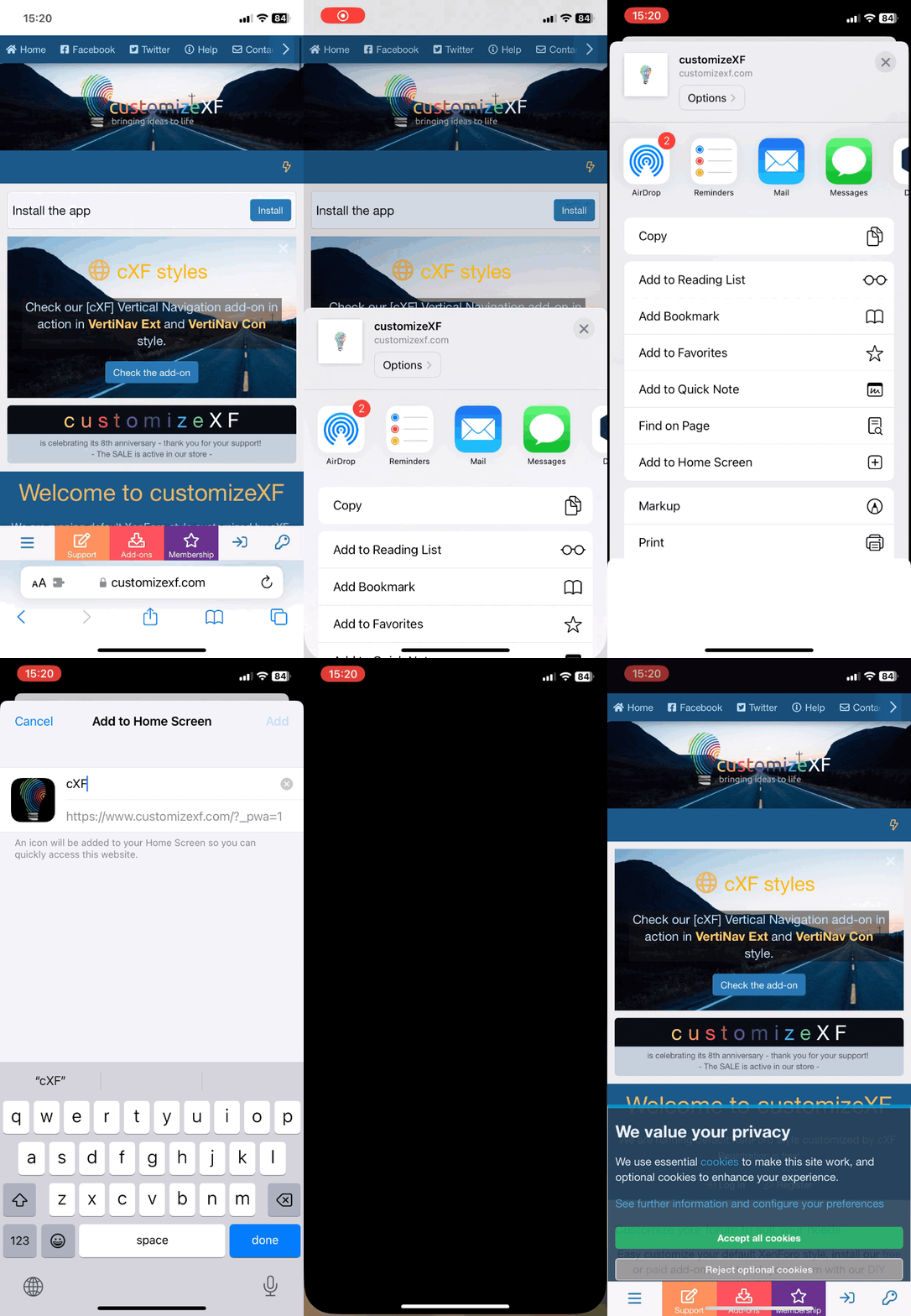
How to install the app on iOS
Follow along with the video below to see how to install our site as a web app on your home screen.
Note: This feature may not be available in some browsers.
Install the app
How to install the app on iOS
Follow along with the video below to see how to install our site as a web app on your home screen.
Note: This feature may not be available in some browsers.
You are using an out of date browser. It may not display this or other websites correctly.
You should upgrade or use an alternative browser.
You should upgrade or use an alternative browser.
Featured content
This "resource" is only to evaluate and review our support and services.
If you like our support with customisations or any of the other help you can get here at customizeXF, please leave us a review.
Thank you!
Description:
Create a widget and add additional widgets inside and show them as tabs. More in screens below.
Features:
create up to 8 tabs and add widgets to preset widget positions
add an icon for widget tab title
easy choose between two tab header styles
show widgets title (useful if you want to have more widgets in the same tab)
hide tabs to a certain user group with permissions
How does it work?
1. Create a widget [cXF] Widgets Tabs and set a position where you would like to show...
Description:
Add staff bar links to visitor panel with some extra features. The default staff bar is removed, because all admin tools are now in account visitor panel (with optional Staff tab for widgets) or in dedicated Admin tab in account visitor panel. See more below.
Features:
remove default staff bar
add staff bar links to account visitor panel (admin, approval queue, reports, etc.) with optional Staff tab for widgets
enable Admin tab in account visitor panel for extra widgets
show...
Description:
With this add-on you can show widgets in columns in an easy way. There are 2 containers available where you can add up to 4 widgets.
That way you can easily make a custom page like a portal with different widgets.
Features:
add 2 widget containers to a different location with up to 4 widgets
style widget container (see examples in screens below)
responsive
How does it work?
create a widget column container in widget position of your choice:
add any widget to...
Description:
Easily style up to 6 custom notices in style properties.
How to enable the custom styling for notice?
When editing a notice in Display styling choose and enter cxfNoticeA, cxfNoticeB, cxfNoticeC, cxfNoticeD, cxfNoticeE or cxfNoticeF. Then edit the style properties.
*make sure you enter the exact same class name as shown above
Screens:
< enter the class name here >
< example of 3 custom notices >
< style properties >
Description:
Stick sidebar on scrolling on almost any page by your choice.
Features:
option to enable sticky sidebar on almost any page separately:
Forum list
Forum View
Thread view
What's new
Notable members
Help pages
Account view
Conversation view
Page view
XFMG Media index
XFMG Category view
XFMG Media view
XFRM Overview
XFRM Category view
XFRM Resource view
it does not affect the mobile view
more in screens below
Compatible with our [cXF] Sidebar for Media add-on
Works with...
Description:
Customize default push notifications notice with some extra features and lots of customization options in style properties.
Features:
default or floating (on the left bottom side) push notification notice
two styles for floating push notification buttons
fully customizable primary and dismiss notice in style properties (background, text color, link color, borders etc.)
enable/disable button for Enable push notifications
enable/disable button for settings next to Enable push...
Description:
Customize the default XenForo cookie notice or make it float. It works also with advanced cookie consent notice (from XenForo 2.2.12).
Demo on our site for floating cookie notice.
for settings check Appearance > Style properties > [cXF] Cookie Notice
< examples >
... this is the advanced cookie notice (in float position) - you can customize it from style properties and change colours per style.
Description:
Add a block for login or register on the thread view bottom.
Features:
option to open the button register/login in an overlay
option to show a block for login and register on thread view after the first and last thread post or only after the last thread post
option to show a block for login and register on the forum view above and below the thread list or only below the thread list
all texts are fully phrased (check phrases for this add-on to edit)
highly customizable in style...
Description:
Show nodes as grid with some extra features.
Features:
exclude selected forums, category, link forum or page node to disable grid view and show as default (full width)
enable grid nodes in style properties
grid nodes work for subforums in forum view and category view too
adjust minimum page width for grid nodes to show
adjust the gap size between nodes
move node statistics (threads and messages count) below node title or hide it
remove last post on forum list, forum view or...
Description:
This add-on adds an icon (optional with text) with link to What's New page on the right side of Alerts tab or Search tab. Text beside icon is phrased so you can easily change it. It's not visible on mobile.
* [cXF] Top Navigation add-on is supported
* works with UI.X style
Features
show What's New icon beside Alerts Tab (optional with text)
show What's New icon beside Search Tab (optional with text)
the text beside icon is phrased so it can be easily changed
set FA icon
set...
Description:
This add-on will show a login form as a widget to guests on your forum.
Features:
add login form as a widget and position it almost anywhere
works with external providers (connected accounts)
Some screens (see a demo on customizexf.com and view it as guest):
Translations:
Russian
FEATURES
sticky or don't sticky top navigation to the top of your forum (separate option for mobile view)
move elements to top navigation: Visitor Tabs only, Search Tab only, Visitor Tabs AND Search tab
add up to 10 links to top navigation (title, URL, open in new tab, open in an overlay, link icon, title for tooltip)
top links are based on permissions
top links can have a drop-down menu with up to 5 custom links
option to add custom code to top menu
adjustable menu width for each menu...
Description:
This add-on will show a welcome notice as widget to guests on your forum.
Features:
add notice as a widget and position it almost anywhere
highly customizable in style properties (change text color, background, icons, button color etc.)
title and description are phrased for easy editing
option to disable widget for mobile screen
Some screens (see a demo on customizexf.com and view it as guest):
FEATURES
fixed (sticky) footer
enable fixed footer so the footer will always stay on top and visible
make fixed footer wide to it fits the browser an not only the forum width
disable fixed footer on mobile if you wish
footer icons
add icons to footer links
choose any Font Awesome icons for links
show only icons
show only icons just on mobile screen
change icon color
change icon hover color
change icon size
footer links
add login and/or register link to footer
add up to three...
Description:
This add-on will add an option for social icons (Facebook, Twitter, Linkedin, Google+ etc.), RSS and/or contact icon to show in header. In fact, you can choose any Font Awesome icon.
Features:
show social network icons in header (Facebook, X, Linkedin, Instagram, etc.); actually you can add any FA icon you want
show contact icon in header; on click contact form will open in overlay
all icons a customizable (color, hover color, size, icon can be changed)
option to open links...
Choose category
Free cXF Add-ons [2.x] cXF Pack A Membership Add-ons [2.x] cXF Pack B Membership Add-ons [2.x] cXF Pack C Membership Add-ons [2.x] cXF DIY Customizations [2.x]
With membership you can access paid add-ons and premium DIY customizations.
*to download FREE add-ons just register for free